<!DOCTYPE html>
    <html lang="vi" xmlns="http://www.w3.org/1999/xhtml" prefix="og: http://ogp.me/ns#">
    <head>
<title>MS Excel - Bài 13&#x3A; Định dạng trang tính và in</title>
<meta name="description" content="MS Excel - Bài 13&#x3A; Định dạng trang tính và in - Savefile - VDC News">
<meta name="author" content="SỬA MACBOOK SỬA CHỮA MACBOOK IMAC MAC PRO CHỮA LAPTOP HÀ NỘI">
<meta name="copyright" content="SỬA MACBOOK SỬA CHỮA MACBOOK IMAC MAC PRO CHỮA LAPTOP HÀ NỘI [ceo@suachuamaytinh.vn]">
<meta name="robots" content="index, archive, follow, noodp">
<meta name="googlebot" content="index,archive,follow,noodp">
<meta name="msnbot" content="all,index,follow">
<meta name="generator" content="NukeViet v4.4">
<meta http-equiv="Content-Type" content="text/html; charset=utf-8">
<meta property="og:title" content="MS Excel - Bài 13: Định dạng trang tính và in">
<meta property="og:type" content="website">
<meta property="og:description" content="Savefile - VDC News">
<meta property="og:site_name" content="SỬA MACBOOK SỬA CHỮA MACBOOK IMAC MAC PRO CHỮA LAPTOP HÀ NỘI">
<link rel="shortcut icon" href="https://www.suachuamaytinh.vn/favicon.ico">
<link rel="canonical" href="https://suachuamaytinh.vn/Kien-thuc-tin-hoc/MS-Excel-Bai-13-Dinh-dang-trang-tinh-va-in-176.html">
<link rel="alternate" href="https://www.suachuamaytinh.vn/rss/" title="VDC News" type="application/rss+xml">
<link rel="alternate" href="https://www.suachuamaytinh.vn/rss/APPLE-HA-NOI/" title="VDC News - APPLE HÀ NỘI" type="application/rss+xml">
<link rel="alternate" href="https://www.suachuamaytinh.vn/rss/DICH-VU-SUA-CHUA-MACBOOK-IMAC-IPHONE-IPAD/" title="VDC News - DỊCH VỤ SỬA CHỮA MACBOOK IMAC IPHONE IPAD" type="application/rss+xml">
<link rel="alternate" href="https://www.suachuamaytinh.vn/rss/TU-VAN-KY-THUAT-CHIA-SE-KINH-NGHIEM-HUONG-DAN-APPLE-MACBOOK-IMAC-IPHONE-IPAD/" title="VDC News - TƯ VẤN KỸ THUẬT CHIA SẺ KINH NGHIỆM HƯỚNG DẪN APPLE MACBOOK IMAC IPHONE IPAD" type="application/rss+xml">
<link rel="alternate" href="https://www.suachuamaytinh.vn/rss/Dich-vu-sua-chua-va-ky-thuat/" title="VDC News - Dịch vụ sửa chữa" type="application/rss+xml">
<link rel="alternate" href="https://www.suachuamaytinh.vn/rss/Chuyen-Nghiep/" title="VDC News - Chuyên Nghiệp" type="application/rss+xml">
<link rel="alternate" href="https://www.suachuamaytinh.vn/rss/Phan-cung-chuyen-sau/" title="VDC News - Phần cứng chuyên sâu" type="application/rss+xml">
<link rel="alternate" href="https://www.suachuamaytinh.vn/rss/Laptop-may-tinh-xach-tay/" title="VDC News - Laptop máy tính xách tay" type="application/rss+xml">
<link rel="alternate" href="https://www.suachuamaytinh.vn/rss/Mainboard-bo-mach-chu/" title="VDC News - Mainboard bo mạch chủ" type="application/rss+xml">
<link rel="alternate" href="https://www.suachuamaytinh.vn/rss/CPU-bo-vi-su-ly/" title="VDC News - CPU bộ vi sử lý" type="application/rss+xml">
<link rel="alternate" href="https://www.suachuamaytinh.vn/rss/Dien-tu-co-ban/" title="VDC News - Điện tử cơ bản" type="application/rss+xml">
<link rel="alternate" href="https://www.suachuamaytinh.vn/rss/Nguon-ATX-PSU-power-supply/" title="VDC News - Nguồn ATX - PSU - power supply" type="application/rss+xml">
<link rel="alternate" href="https://www.suachuamaytinh.vn/rss/Moniter-man-hinh-may-tinh/" title="VDC News - Moniter màn hình máy tính" type="application/rss+xml">
<link rel="alternate" href="https://www.suachuamaytinh.vn/rss/USB-MP3-MP4/" title="VDC News - USB-MP3-MP4" type="application/rss+xml">
<link rel="alternate" href="https://www.suachuamaytinh.vn/rss/Kien-thuc-tin-hoc/" title="VDC News - Kiến thức tin học" type="application/rss+xml">
<link rel="alternate" href="https://www.suachuamaytinh.vn/rss/Thu-thuat-may-tinh/" title="VDC News - Thủ thuật máy tính " type="application/rss+xml">
<link rel="alternate" href="https://www.suachuamaytinh.vn/rss/Thu-thuat-van-phong/" title="VDC News - Thủ thuật văn phòng " type="application/rss+xml">
<link rel="alternate" href="https://www.suachuamaytinh.vn/rss/MS-PowerPoint/" title="VDC News - MS PowerPoint" type="application/rss+xml">
<link rel="alternate" href="https://www.suachuamaytinh.vn/rss/MS-Word/" title="VDC News - MS Word" type="application/rss+xml">
<link rel="alternate" href="https://www.suachuamaytinh.vn/rss/MS-Excel/" title="VDC News - MS Excel" type="application/rss+xml">
<link rel="alternate" href="https://www.suachuamaytinh.vn/rss/Cach-diet-virus/" title="VDC News - Cách diệt virus " type="application/rss+xml">
<link rel="alternate" href="https://www.suachuamaytinh.vn/rss/Cong-cu-diet-Virus/" title="VDC News - Công cụ diệt Virus " type="application/rss+xml">
<link rel="alternate" href="https://www.suachuamaytinh.vn/rss/Bao-mat-virus/" title="VDC News - Bảo mật, virus " type="application/rss+xml">
<link rel="alternate" href="https://www.suachuamaytinh.vn/rss/Huong-dan-su-dung-phan-mem/" title="VDC News - Hướng dẫn sử dụng phần mềm" type="application/rss+xml">
<link rel="alternate" href="https://www.suachuamaytinh.vn/rss/Tin-Tuc-Cong-Nghe-Thong-Tin/" title="VDC News - Tin Tức Công Nghệ Thông Tin" type="application/rss+xml">
<link rel="alternate" href="https://www.suachuamaytinh.vn/rss/Vien-thong/" title="VDC News - Viễn thông" type="application/rss+xml">
<link rel="alternate" href="https://www.suachuamaytinh.vn/rss/Tien-Ich/" title="VDC News - Tiện Ích" type="application/rss+xml">
<link rel="alternate" href="https://www.suachuamaytinh.vn/rss/Khoa-hoc-may-tinh/" title="VDC News - Khoa học máy tính" type="application/rss+xml">
<link rel="alternate" href="https://www.suachuamaytinh.vn/rss/Lap-trinh/" title="VDC News - Lập trình" type="application/rss+xml">
<link rel="alternate" href="https://www.suachuamaytinh.vn/rss/Do-hoa-vi-tinh/" title="VDC News - Đồ họa vi tính" type="application/rss+xml">
<link rel="alternate" href="https://www.suachuamaytinh.vn/rss/He-Dieu-Hanh/" title="VDC News - Hệ Điều Hành" type="application/rss+xml">
<link rel="alternate" href="https://www.suachuamaytinh.vn/rss/Thu-thuat-seo/" title="VDC News - Thủ thuật seo" type="application/rss+xml">
<link rel="alternate" href="https://www.suachuamaytinh.vn/rss/Review-san-pham/" title="VDC News - Review sản phẩm" type="application/rss+xml">
<link rel="alternate" href="https://www.suachuamaytinh.vn/rss/Nguon-may-tinh-power-supply/" title="VDC News - Nguồn máy tính power supply" type="application/rss+xml">
<link rel="alternate" href="https://www.suachuamaytinh.vn/rss/Man-hinh-Moniter/" title="VDC News - Màn hình Moniter" type="application/rss+xml">
<link rel="alternate" href="https://www.suachuamaytinh.vn/rss/Chuot-may-tinh-mouse/" title="VDC News - Chuột máy tính mouse" type="application/rss+xml">
<link rel="alternate" href="https://www.suachuamaytinh.vn/rss/CARD-man-hinh-VGA/" title="VDC News - CARD màn hình VGA" type="application/rss+xml">
<link rel="alternate" href="https://www.suachuamaytinh.vn/rss/Bo-mach-chu-MAINBOARD/" title="VDC News - Bo mạch chủ MAINBOARD" type="application/rss+xml">
<link rel="alternate" href="https://www.suachuamaytinh.vn/rss/Linh-tinh/" title="VDC News - Linh tinh" type="application/rss+xml">
<link rel="alternate" href="https://www.suachuamaytinh.vn/rss/O-cung-Hard-disk-drive/" title="VDC News - Ổ cứng - Hard disk drive" type="application/rss+xml">
<link rel="alternate" href="https://www.suachuamaytinh.vn/rss/Vo-may-tinh-CASE/" title="VDC News - Vỏ máy tính - CASE" type="application/rss+xml">
<link rel="alternate" href="https://www.suachuamaytinh.vn/rss/Bo-tan-nhiet/" title="VDC News - Bộ tản nhiệt" type="application/rss+xml">
<link rel="alternate" href="https://www.suachuamaytinh.vn/rss/Mang-khong-day-ROUTER-WIRELESS/" title="VDC News - Mạng không dây - ROUTER WIRELESS" type="application/rss+xml">
<link rel="alternate" href="https://www.suachuamaytinh.vn/rss/May-tinh-xach-tay-LAPTOP/" title="VDC News - Máy tính xách tay - LAPTOP" type="application/rss+xml">
<link rel="alternate" href="https://www.suachuamaytinh.vn/rss/Ram-bo-nho-trong/" title="VDC News - Ram - bộ nhớ trong" type="application/rss+xml">
<link rel="alternate" href="https://www.suachuamaytinh.vn/rss/CPU-bo-vi-xu-ly/" title="VDC News - CPU bộ vi xử lý" type="application/rss+xml">
<link rel="alternate" href="https://www.suachuamaytinh.vn/rss/May-tinh-bang/" title="VDC News - Máy tính bảng" type="application/rss+xml">
<link rel="alternate" href="https://www.suachuamaytinh.vn/rss/Kien-thuc-su-dung-Laptop-dung-cach/" title="VDC News - Kiến thức sử dụng Laptop đúng cách" type="application/rss+xml">
<link rel="alternate" href="https://www.suachuamaytinh.vn/rss/Huong-dan-su-dung/" title="VDC News - Hướng  dẫn sử dụng" type="application/rss+xml">
<link rel="alternate" href="https://www.suachuamaytinh.vn/rss/Thu-thuat-kinh-nghiem/" title="VDC News - Thủ thuật kinh nghiệm" type="application/rss+xml">
<link rel="alternate" href="https://www.suachuamaytinh.vn/rss/Tu-van-chon-laptop/" title="VDC News - Tư vấn chọn laptop" type="application/rss+xml">
<link rel="alternate" href="https://www.suachuamaytinh.vn/rss/Thong-tin-khoa-hoc/" title="VDC News - Thông tin khoa học" type="application/rss+xml">
<link rel="alternate" href="https://www.suachuamaytinh.vn/rss/Khoa-hoc-vu-tru/" title="VDC News - Khoa học vũ trụ" type="application/rss+xml">
<link rel="alternate" href="https://www.suachuamaytinh.vn/rss/Phat-minh-khoa-hoc/" title="VDC News - Phát minh khoa học" type="application/rss+xml">
<link rel="alternate" href="https://www.suachuamaytinh.vn/rss/Cong-trinh-khoa-hoc/" title="VDC News - Công trình khoa học" type="application/rss+xml">
<link rel="alternate" href="https://www.suachuamaytinh.vn/rss/Cong-nghe-moi/" title="VDC News - Công nghệ mới" type="application/rss+xml">
<link rel="alternate" href="https://www.suachuamaytinh.vn/rss/Suy-Ngam/" title="VDC News - Suy Ngẫm" type="application/rss+xml">
<link rel="alternate" href="https://www.suachuamaytinh.vn/rss/Thu-gian/" title="VDC News - Thư giãn" type="application/rss+xml">
<link rel="alternate" href="https://www.suachuamaytinh.vn/rss/The-gioi/" title="VDC News - Thế giới" type="application/rss+xml">
<link rel="alternate" href="https://www.suachuamaytinh.vn/rss/Phan-tich/" title="VDC News - Phân tích" type="application/rss+xml">
<link rel="preload" as="script" href="https://www.suachuamaytinh.vn/assets/js/jquery/jquery.min.js">
<link rel="preload" as="script" href="https://www.suachuamaytinh.vn/assets/js/language/vi.js">
<link rel="preload" as="script" href="https://www.suachuamaytinh.vn/assets/js/DOMPurify/purify.js">
<link rel="preload" as="script" href="https://www.suachuamaytinh.vn/assets/js/global.js">
<link rel="preload" as="script" href="https://www.suachuamaytinh.vn/assets/js/site.js">
<link rel="preload" as="script" href="https://www.suachuamaytinh.vn/themes/default/js/news.js">
<link rel="preload" as="script" href="https://www.suachuamaytinh.vn/themes/default/js/main.js">
<link rel="preload" as="script" href="https://www.suachuamaytinh.vn/themes/default/js/custom.js">
<link rel="preload" as="script" href="https://www.suachuamaytinh.vn/themes/default/js/bootstrap.min.js">
<link rel="stylesheet" href="https://www.suachuamaytinh.vn/assets/css/font-awesome.min.css">
<link rel="stylesheet" href="https://www.suachuamaytinh.vn/themes/default/css/bootstrap.non-responsive.css">
<link rel="stylesheet" href="https://www.suachuamaytinh.vn/themes/default/css/style.css">
<link rel="stylesheet" href="https://www.suachuamaytinh.vn/themes/default/css/style.non-responsive.css">
<link rel="StyleSheet" href="https://www.suachuamaytinh.vn/themes/default/css/news.css">
<link rel="stylesheet" href="https://www.suachuamaytinh.vn/themes/default/css/custom.css">
<style type="text/css">
	body{background: #fff;}
</style>
    </head>
    <body>
<div id="print">
	<div id="hd_print">
		<h2 class="pull-left">SỬA MACBOOK SỬA CHỮA MACBOOK IMAC MAC PRO CHỮA LAPTOP HÀ NỘI</h2>
		<p class="pull-right"><a title="SỬA MACBOOK SỬA CHỮA MACBOOK IMAC MAC PRO CHỮA LAPTOP HÀ NỘI" href="https://www.suachuamaytinh.vn/">https://www.suachuamaytinh.vn</a></p>
	</div>
	<div class="clear"></div>
	<hr />
	<div id="content">
		<h1>MS Excel - Bài 13: Định dạng trang tính và in</h1>
		<ul class="list-inline">
			<li>Thứ năm - 12/11/2009 03:49</li>
			<li class="hidden-print txtrequired"><em class="fa fa-print">&nbsp;</em><a title="In ra" href="javascript:;" onclick="window.print()">In ra</a></li>
			<li class="hidden-print txtrequired"><em class="fa fa-power-off">&nbsp;</em><a title="Đóng cửa sổ này" href="javascript:;" onclick="window.close()">Đóng cửa sổ này</a></li>
		</ul>
		<div class="clear"></div>
		<div id="hometext">
						<div class="pull-left imghome">
				<img alt="MS Excel - Bài 13: Định dạng trang tính và in" src="https://www.suachuamaytinh.vn/assets/news/2009_11/1258015792.nv.jpg" width="100" class="img-thumbnail" />
			</div>
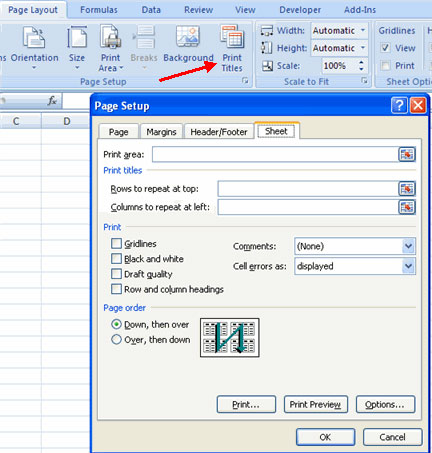
			Thiết lập nhãn in<br />Chức năng Print Titles cho phép bạn lặp lại các heading của cột và dòng vào đầu mỗi trang mới để đọc nhiều trang dễ hơn là đọc khi in. Để thiết lập Print Titles:<br /><br />• Kích tab Page Layout trên vùng Ribbon<br /><br />• Kích nút Print Titles
		</div>
		<div id="bodytext" class="clearfix">
<p>• Trong phần Print Titles, kích vào hộp để chọn dòng hay cột để được lặp lại</p>
<p>• Lựa chọn dòng hay cột</p>
<p>• Kích nút <strong>Select Row/Column</strong></p>
<p>• Kích <strong>OK</strong>
  <br />
  <table cellspacing="1" cellpadding="4" width="100" align="center" border="0">
    <tbody>
      <tr>
        <td><img height="453" alt="" src="http://www.quantrimang.com.vn/photos/Image/112009/07/page1.jpg" width="432" /></td>
      </tr>
    </tbody>
  </table>
  <br /><span style="COLOR: #0000ff">Tạo Header và Footer</span></p>
<p>Để tạo header hay footer:</p>
<p>• Kích nút <strong>Header &amp; Footer</strong> trên tab <strong>Insert</strong></p>
<p>• Lúc này, tab Design cho Header &amp; Footer sẽ xuất hiệ trên vùng Ribbon</p>
<p>• Để chuyển đổi giữa Header và Footer, kích nút <strong>Go to Header</strong> hoặc <strong>Go to Footer</strong>
  <br />
  <table cellspacing="1" cellpadding="4" width="100" align="center" border="0">
    <tbody>
      <tr>
        <td><img alt="" src="http://www.quantrimang.com.vn/photos/Image/112009/07/page2.jpg" /></td>
      </tr>
    </tbody>
  </table>
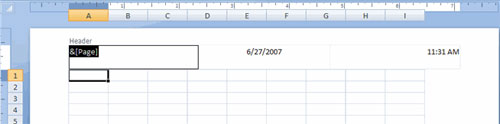
  <br />• Để chèn văn bản: nhập văn bản vào header hay footer</p>
<p>• Để nhập dữ liệu được chương trình hóa trước như số trang, ngày, giờ, tên file hoặc tên trang tính. Kích biểu tượng thích hợp</p>
<p>• Để thay đổi vị trí của dữ liệu, kích chọn ô bạn muốn
  <br />
  <table cellspacing="1" cellpadding="4" width="100" align="center" border="0">
    <tbody>
      <tr>
        <td><img alt="" src="http://www.quantrimang.com.vn/photos/Image/112009/07/page3.jpg" /></td>
      </tr>
    </tbody>
  </table><span style="COLOR: #0000ff"><strong>Thiết lập lề trang</strong></span></p>
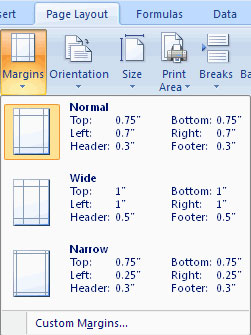
<p>Để thiết lập lề trang:</p>
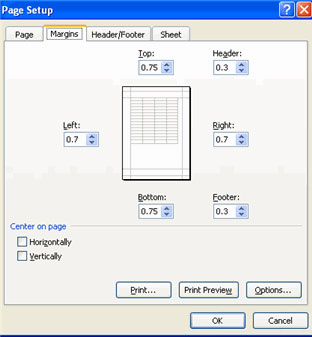
<p>• Kích nút <strong>Margins</strong> trên tab <strong>Page Layout</strong></p>
<p>• Lựa chọn một trong các lựa chọn đưa ra, hoặc
  <br />
  <table cellspacing="1" cellpadding="4" width="100" align="center" border="0">
    <tbody>
      <tr>
        <td><img alt="" src="http://www.quantrimang.com.vn/photos/Image/112009/07/page4.jpg" /></td>
      </tr>
    </tbody>
  </table>• Kích <strong>Custom Margins</strong></p>
<p>• Hoàn thành hộp thoại thiết lập lề trang</p>
<p>• Kích <strong>OK.</strong>
  <table cellspacing="1" cellpadding="4" width="100" align="center" border="0">
    <tbody>
      <tr>
        <td><img alt="" src="http://www.quantrimang.com.vn/photos/Image/112009/07/page5.jpg" /></td>
      </tr>
    </tbody>
  </table><span style="COLOR: #0000ff"><strong>Thay đổi hướng trang</strong></span></p>
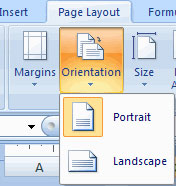
<p>Để thay đổi hướng trang từ dọc tới ngang:</p>
<p>• Kích nút <strong>Orientation</strong> trên tab <strong>Page Layout</strong></p>
<p>• Chọn Portrait (dọc) hay Landscape (ngang)
  <br />
  <table cellspacing="1" cellpadding="4" width="100" align="center" border="0">
    <tbody>
      <tr>
        <td><img alt="" src="http://www.quantrimang.com.vn/photos/Image/112009/07/page6.jpg" /></td>
      </tr>
    </tbody>
  </table><span style="COLOR: #0000ff"><strong>Thiết lập ngắt trang</strong></span></p>
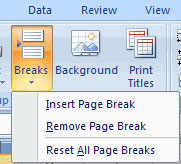
<p>Bạn có thể thiết lập ngắt trang trong một bảng tính để đọc trang tính một cách dễ dàng khi in. Để thiết lập ngắt trang:</p>
<p>• Kích nút <strong>Breaks</strong> trên tab Page Layout</p>
<p>• Kích <strong>Insert Page Break</strong>
  <br />
  <table cellspacing="1" cellpadding="4" width="100" align="center" border="0">
    <tbody>
      <tr>
        <td><img alt="" src="http://www.quantrimang.com.vn/photos/Image/112009/07/page7.jpg" /></td>
      </tr>
    </tbody>
  </table><span style="COLOR: #0000ff"><strong>In một vùng</strong></span></p>
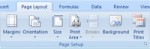
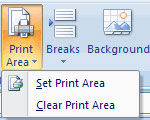
<p>Có thể bạn chỉ muốn in một phần của một bảng tính. Công việc này được thực hiện một cách dễ dàng thông qua chức năng <strong>Print Range</strong>. Để in một vùng:</p>
<p>• Lựa chọn vùng được in</p>
<p>• Kích nút <strong>Print Area</strong> trên tab Page Layout</p>
<p>• Kích <strong>Set Print Area</strong>.
  <br />
  <table cellspacing="1" cellpadding="4" width="100" align="center" border="0">
    <tbody>
      <tr>
        <td><img alt="" src="http://www.quantrimang.com.vn/photos/Image/112009/07/page8.jpg" /></td>
      </tr>
    </tbody>
  </table></p>
		</div>
	</div>
	<div id="footer" class="clearfix">
		<div id="url">
			<strong>URL của bản tin này: </strong><a href="https://www.suachuamaytinh.vn/Kien-thuc-tin-hoc/MS-Excel-Bai-13-Dinh-dang-trang-tinh-va-in-176.html" title="MS Excel - Bài 13: Định dạng trang tính và in">https://www.suachuamaytinh.vn/Kien-thuc-tin-hoc/MS-Excel-Bai-13-Dinh-dang-trang-tinh-va-in-176.html</a>

		</div>
		<div class="clear"></div>
		<div class="copyright">
			&copy; SỬA MACBOOK SỬA CHỮA MACBOOK IMAC MAC PRO CHỮA LAPTOP HÀ NỘI
		</div>
		<div id="contact">
			<a href="mailto:ceo@suachuamaytinh.vn">ceo@suachuamaytinh.vn</a>
		</div>
	</div>
</div>
        <div id="timeoutsess" class="chromeframe">
            Bạn đã không sử dụng Site, <a onclick="timeoutsesscancel();" href="https://www.suachuamaytinh.vn/#">Bấm vào đây để duy trì trạng thái đăng nhập</a>. Thời gian chờ: <span id="secField"> 60 </span> giây
        </div>
        <div id="openidResult" class="nv-alert" style="display:none"></div>
        <div id="openidBt" data-result="" data-redirect=""></div>
<script src="https://www.suachuamaytinh.vn/assets/js/jquery/jquery.min.js"></script>
<script>var nv_base_siteurl="/",nv_lang_data="vi",nv_lang_interface="vi",nv_name_variable="nv",nv_fc_variable="op",nv_lang_variable="language",nv_module_name="news",nv_func_name="savefile",nv_is_user=0, nv_my_ofs=-4,nv_my_abbr="EDT",nv_cookie_prefix="nv4c_w6h9e",nv_check_pass_mstime=1738000,nv_area_admin=0,nv_safemode=0,theme_responsive=0,nv_is_recaptcha=0,XSSsanitize=1;</script>
<script src="https://www.suachuamaytinh.vn/assets/js/language/vi.js"></script>
<script src="https://www.suachuamaytinh.vn/assets/js/DOMPurify/purify.js"></script>
<script src="https://www.suachuamaytinh.vn/assets/js/global.js"></script>
<script src="https://www.suachuamaytinh.vn/assets/js/site.js"></script>
<script src="https://www.suachuamaytinh.vn/themes/default/js/news.js"></script>
<script src="https://www.suachuamaytinh.vn/themes/default/js/main.js"></script>
<script src="https://www.suachuamaytinh.vn/themes/default/js/custom.js"></script>
<script type="application/ld+json">
        {
            "@context": "https://schema.org",
            "@type": "Organization",
            "url": "https://www.suachuamaytinh.vn",
            "logo": "https://www.suachuamaytinh.vn/uploads/shop-cong-nghe-vdc.png"
        }
        </script>
<script src="https://www.suachuamaytinh.vn/themes/default/js/bootstrap.min.js"></script>
</body>
</html>